Why build an AppWeaver app?
How AppWeaver apps turn focused local workflows into commands, widgets, AI tools, prompts, scheduled automation, and Nostr-native capabilities.
What is AppWeaver?
AppWeaver is an open-source app hub for running AI-powered tools from a project or workspace folder you control. You can use it through the web UI, Nostr DMs, commands, or AI prompts. The main idea is simple: instead of building one giant assistant, AppWeaver lets focused apps add their own tools, commands, widgets, and workflows into the same local system.
The user decides which apps to install in the current workspace. That also means the same person can have multiple AppWeaver instances with different goals: one for a software project, one for publishing, one for personal notes, or one for a specific experiment. Each workspace can have its own set of apps, data, and workflows.
What is an AppWeaver app?
An AppWeaver app is a focused plugin that adds a capability to the hub. It might manage todos, bookmarks, scheduled jobs, files, a nostr client do publishing, browser automation, or something completely different. The app decides what commands to register, what UI is shown, what data is stored, and what tools AI agents are allowed to call.
Anyone can write their own app. It can be focused on a public use case, or it can be a private tool that only makes sense for your own workflow. If you want others to use it, you can publish it, too. If it is just for you, it can stay local and private.
What can be an app?
A good AppWeaver app usually starts from a repeated workflow. If you often check a webpage, manage a list, inspect files, save links, publish notes, organize local data, or ask AI to perform the same kind of task again and again, that might become an app.
Another signal is structured data. If you want to keep records in a predictable shape, manipulate them from one or multiple interfaces, and attach a workflow around them, an AppWeaver app can be a good fit. The app gives that data commands, UI, AI tools, and repeatable behavior instead of leaving everything as a loose prompt.
What tools does AppWeaver provide to app builders?
Tools AI can call
The most important primitive is the tool system. An app can expose specific functions that AI agents are allowed to call: list todos, create a bookmark draft, create a summary of a folder with the File Manager, schedule a job, open a browser tab, and so on.
User prompts and interactive workflows
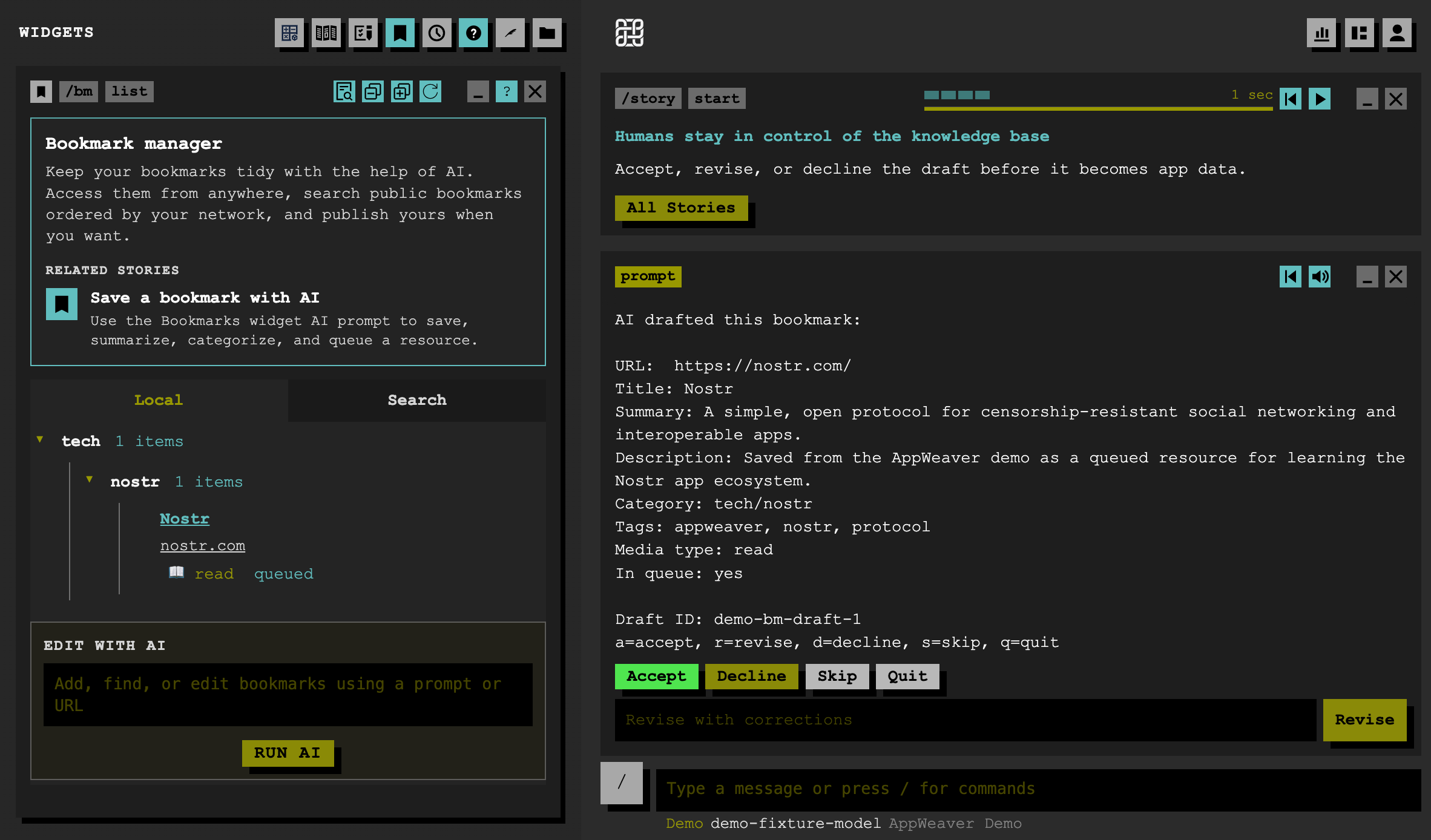
Apps can also define user-facing prompts and workflows. A prompt can pause a command, show the user a small decision, and continue after the user answers. The Bookmark Manager uses this for AI-assisted draft review: it shows a draft, asks whether to accept, revise, skip, or quit, then applies the chosen action and moves to the next draft.
The same pattern can stay fully text-based too. The Todo app duel asks “Which is more important?” with A, B, Skip, and Quit options, then records the answer and continues the prioritization session.
Access to the current AI agent
Apps can use the active AI backend/session. It's useful for workflows that need reasoning, summarization, classification, or code assistance.
Apps can compose through skills
Apps do not have to work alone. Since AppWeaver exposes app capabilities as skills and tools, users can compose them. A scheduled job can use the browser app to check a webpage every morning.
Nostr-native capabilities
AppWeaver also provides Nostr-native building blocks:
- send messages through Nostr DMs
- check Web of Trust scores for pubkeys
- use bunker connections to sign events
- publish or interact with Nostr data from your apps
One app, many interfaces
One reason to build an AppWeaver app is that you are not only building a web page. A command can power chat, web UI actions, AI tools, scheduled jobs, and Nostr DM workflows. The same app can become useful in many interfaces without rewriting the core logic each time.
AppWeaver gives app developers these surfaces out of the box. You can focus on the app's data model and workflow, then expose it through the interfaces that make sense: command text, web UI, AI tools, scheduled jobs, Nostr messages, or a combination of them.
Apps can also define UI with AppWeaver's shared web node schema. Instead of every plugin inventing its own frontend protocol, an app returns structured UI nodes: rows, buttons, forms, trees, text, actions, and other reusable pieces.
When the generic building blocks are not enough, apps can attach custom class names and scoped stylesheets to the rendered output. That lets the app tune layout, color, and component details while still using AppWeaver's shared renderer and action system. The web client renders those generic nodes, applies the plugin stylesheet, and the app stays focused on describing the workflow.
What else does AppWeaver provide?
Command-based backend pattern
- A good way to organize code
- Callable from the command pallete or UI actions
- Commands can return text, structured data, or web UI.
Distribution mechanism
- Apps can be published and installed.
- Users can discover/install apps from AppWeaver.
- App metadata, author info, install flow.
Story / walkthrough mechanism
Apps can include stories that demonstrate how a workflow works. A story can define bootstrap data, expected command outputs, highlighted UI targets, and step-by-step instructions. This is useful for onboarding because users can see the app in action before they have their own real data.
Public roadmaps
Apps can also have public roadmaps. Users can share feedback through issues and feature requests, and signal which items matter most by voting with BTC zaps. That gives app developers a lightweight way to understand what users want next without needing a separate product-management system.
Create a new app from a template
You do not have to start from a blank folder. AppWeaver includes a template script that creates a simple plugin structure:
bun run scripts/new-plugin.tsFrom there, you can continue shaping the app however you like. Start with one command, one data model, or one useful tool. Once that first workflow feels right, you can add widgets, AI tools, stories, distribution metadata, and roadmap links.
What makes a good AppWeaver app?
A good AppWeaver app usually has a clear workflow and a clear boundary. It does not need to do everything; it needs to make one kind of work easier to repeat, inspect, and automate. It exposes useful functionality so the user can compose it with other tools when they want to.
Some good signals:
- It keeps app data persistent and structured, often in a local database like SQLite.
- It exposes AI tools that agents can call safely.
- It asks for user review or approval where needed, especially before changing data.
- It can be used from a Nostr chat app, the web UI, the command palette, or AI workflows.
- It uses reusable UI pieces where they fit, such as a TreeView for structured data with built-in filtering, expand, and collapse behavior.
- It exposes clear functionality that users can combine with other apps, commands, scheduled jobs, or AI workflows.
The best apps often start small. A list command, a create draft flow, or one interactive widget can be enough to prove the idea.
Closing
Start with the workflow you already repeat. Turn it into one command, one tool, or one small UI. If it keeps helping you, it can grow into an AppWeaver app.